

Threads Auto
Create, schedule, reply and track results across multiple Threads accounts in one place
Overview
Threads Auto is an Electron desktop app where Codex CLI-based agents pick topics, write posts and review quality based on each account's topic and tone. It schedules or instantly publishes daily posts and content drawn from blog RSS, YouTube, Coupang Partners and Naver Brand Connect products, following a per-account operating plan. It runs on an installed, logged-in Codex CLI instead of a separate OpenAI API key and keeps data on the local PC.
The problem
Running several Threads accounts means repeating sourcing, writing, review, publishing, replies and performance checks every day while keeping each account's voice distinct. Promoting affiliate products or blog and YouTube content adds the work of gathering and organizing supporting material. Threads Auto folds that routine into per-account operating plans and a role-based agent pipeline inside one app.
Built for
- Creators and marketers running multiple Threads accounts
- Operators promoting Coupang Partners and Naver Brand Connect products
- Users extending blog and YouTube content to Threads
- Users who already have a Codex CLI account
Capabilities
Key capabilities
- Account Voice01
A distinct voice per account
Set topic, personality, tone, audience and forbidden expressions per account, and run several accounts side by side.
- Agent Review02
From drafting to review
Orchestrator, topic, writer and reviewer agents check evidence and naturalness, rejecting drafts against roughly 30 quality veto codes and returning the reasons for revision. Duplicate context is trimmed to avoid wasted tokens.
- Scheduling03
Scheduled and instant publishing
Configure operating days, times, post count and the daily-to-promotion ratio for automatic publishing, or publish right away by content type.
- Sources04
Varied sources and product capture
Blog RSS, YouTube, Coupang Partners and Naver Brand Connect products serve as source material. A Chrome extension captures product images and review evidence from the current Chrome session and hands them to the app.
- Dashboard05
Operations at a glance
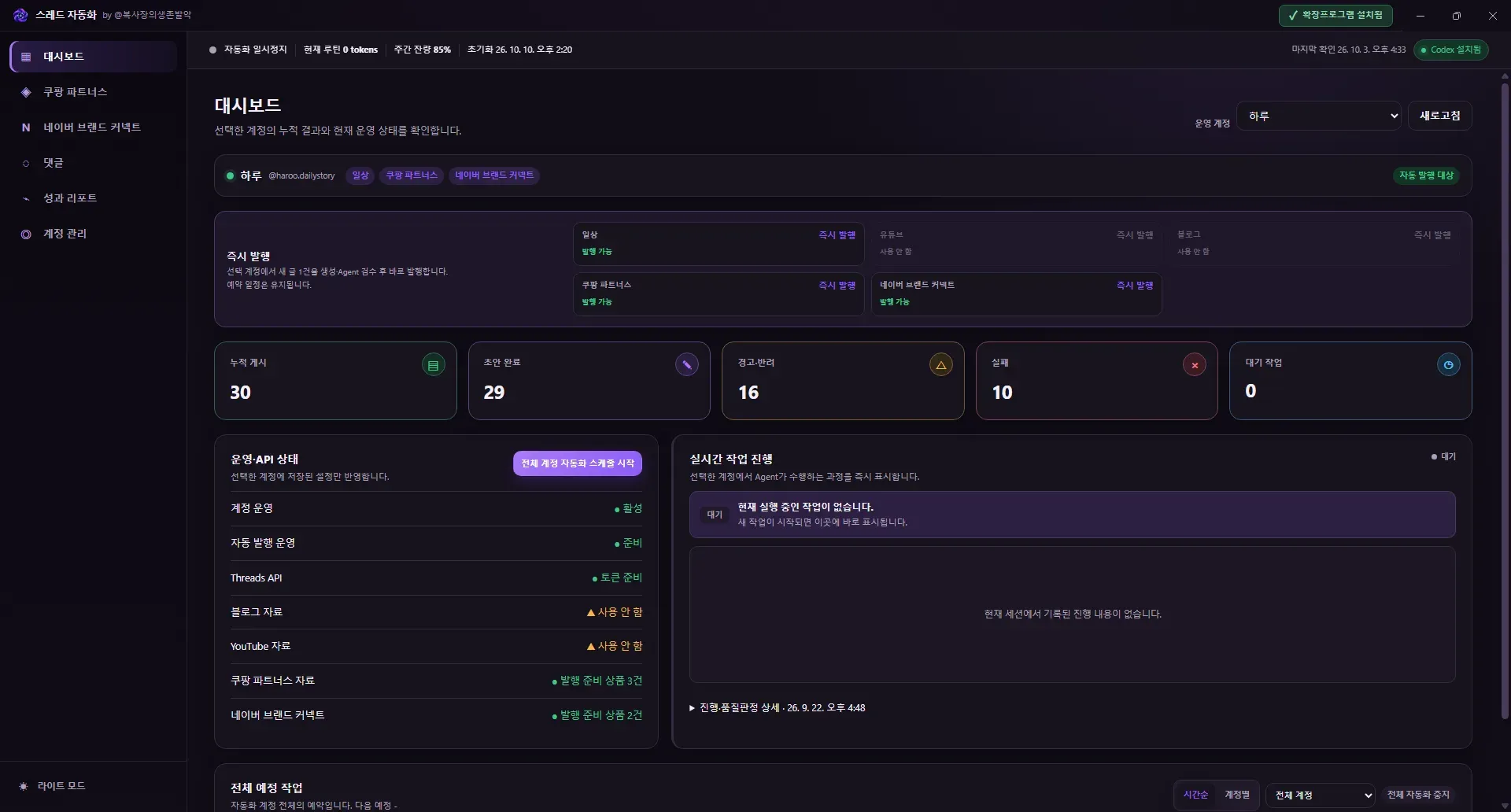
Track live job progress, comment handling, post performance and Codex usage on one screen, in light or dark theme.
- Local First06
Data stays local
Settings and history are stored in local SQLite, and credentials are encrypted through the OS secure store. Keys never go into source or .env.
Architecture
A self-contained local stack
The UI, pipeline, agent runs and storage all live on the user's PC, reaching outward only to service APIs such as Threads and YouTube and to the Chrome extension.
Workflow
How it works
- 01
Queue and discover
The scheduler plans publishing slots from each account's days, times and daily-to-promotion ratio, or an instant-publish request queues a job (QUEUED), which then moves to discovery (DISCOVER).
- 02
Gather sources
Material is collected from blog RSS, YouTube, Coupang Partners or Naver Brand Connect depending on content type (SOURCE).
- 03
Pick a topic
The topic agent chooses a subject from the account settings and gathered material (TOPIC).
- 04
Write the draft
The writer agent drafts the post in the account's voice and, if rejected, revises from review feedback, with up to three submissions in total (WRITER).
- 05
Independent review
The reviewer agent returns PASS or REJECT, attaching quality veto reasons when it rejects (REVIEWER).
- 06
Final decision
The orchestrator makes the final call, and only unpublished drafts that passed review become eligible to publish (ORCHESTRATOR).
- 07
Publish and record
The post is published through the Threads API (PUBLISH), and the result is recorded as COMPLETED, REJECTED, FAILED or STOPPED (DONE).
Gallery
Screens
01Operations dashboard
Tech stack
- Electron 44Desktop shell with a custom title bar and the main process
- React 19Dashboard and account and content management screens
- TypeScript 6Primary language across main, preload and renderer
- Codex CLIExternal runtime that runs agent stages without a separate API key
- better-sqlite3 13Local SQLite for settings, jobs and publishing history
- zod 4Validation for IPC input and data schemas
- Electron Forge 7 + Vite 7Dev runs, packaging and Windows and macOS distributables
- Chrome Manifest V3Shopping product collector over Native Messaging
Requirements
- Windows or macOS
- Node.js 24.x (24.15 or later), npm and Git for development mode
- An installed, logged-in Codex CLI
- A long-lived Threads access token (YouTube and Coupang API keys only when using those features)
- Google Chrome with the Threads Auto extension for product capture
git clone https://github.com/boksajang/threads-auto.git
cd threads-auto
npm run setup
npm start